NewWhich AI model makes the best CX & SDR agent?See the benchmark

Changelog

Quality improvements

Improvements

  • Breadcrumb links at the top of app pages underline when you hover over them.
  • In a test conversation message's Metadata dialog, long JSON values wrap at punctuation and keep their indentation.
  • With text in the Metadata search field, press Escape to clear it without closing the dialog.
More consistent test instruction following

Better instruction following

In test conversations, the tester follows your instructions more consistently, including when you choose a personality. This reduces early endings and replies that include things your instructions prohibit.

Improvements

  • Score colors match across results, Home scenario cards, and Compare. A failed blocker no longer changes the score's color or adds a warning triangle.
  • On Home, scenario cards show failing for scores below 60 when no blocker has failed.
  • Numbers in Compare reports and Settings usage use the same font as the surrounding text.

Fixes

  • When test instructions don't say whose messages count toward a limit, only the tester's messages count. Your agent's replies no longer use up that limit.
  • Hallucination detection interprets today and relative dates using the test conversation's UTC day, reducing date shifts when a result is processed later.

More selective run requests

Filter run requests

In the API, GET /runs/ accepts a scenario filter and multiple comma-separated status values. Use changedSince with an ISO 8601 timestamp to retrieve runs started after that time together with unfinished runs, narrowed by your other filters.

Improvements

  • In the API, use GET /runs/?scenario=<id>&output=minimal for compact scenario run history. Compact responses include scenario.isArchived.
  • Opening Home, scenario Run history, Compare reports, and the linked agents dialog takes less time.

Follow-up questions in test conversations

Answering follow-up questions

In test conversations, the tester answers when your agent asks for missing information, instead of skipping to the next step. Tester-written replies follow the personality selected for the run; exact scripted lines stay unchanged.

Improvements

  • Filters on Results, Agents, and Scenarios fit their content and keep a visible applied state while hovered. In Agents, the Type column and Filter by type show readable names such as Webhook.
  • Results hides scheduled runs by default. Turn on Show scheduled to include them.
  • In Settings, Team members shows an avatar beside each member's name.
  • Action buttons in Webhook setup, Compare, and Settings place icons after their labels for consistent alignment.
  • In the API, GET /agents/ supports type and owner filters. Add output=minimal for compact agent records.
  • Agent pickers and the workspace menu load faster.

Workflow guides through Voxli MCP

Guides for your AI assistant

Through Voxli MCP, your AI assistant can get guides for writing and improving tests, writing assertions, interpreting results, and setting up local testing. Use get_voxli_guide(topic) without installing the separate Voxli skill.

Improvements

  • In the API, filter GET /runs/ by runGroup to retrieve runs from one launch. Compact responses include runGroup and hallucinationStatus so you can track hallucination detection, including failures.

Try assertions before saving them

Try Test Assertions through MCP

Through Voxli MCP, use try_test_assertions(result_id, assertions) to try up to 10 new assertions against a completed test's conversation. Try Test Assertions returns a pass or fail with an explanation for each, without changing the saved test or recorded result.

Improvements

  • Assertion grading in test results is better at rejecting replies that don't answer the question or arrive on a turn the criteria don't allow. Existing scores stay unchanged.
  • In Agents, Webhook and Ebbot connection forms explain invalid settings when you save.

Fixes

  • Using Enable or Disable in Scheduled Runs no longer blanks the page with a table error.

Retry canceled and stuck runs

Retry canceled and stuck tests

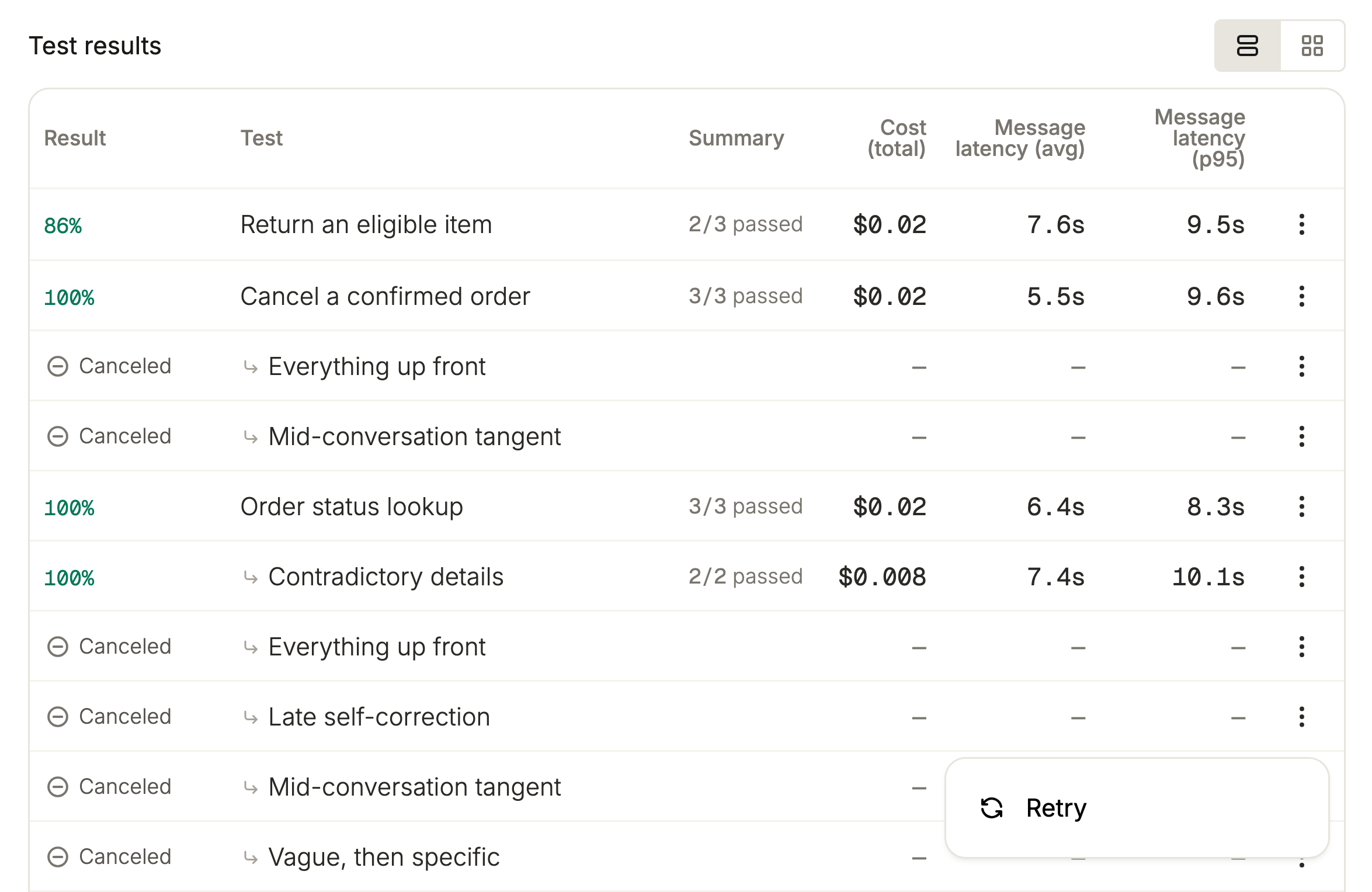
Use Retry in a Test results row's menu to retry a test in a canceled run or one stuck as pending or running. A retry starts a fresh conversation for the same test case; a canceled run reopens until the replacement finishes.

Tests for a canceled run. The menu on a canceled test is open, showing Retry.

Separate runs for each personality

In a scenario's advanced launch options, select multiple personalities to create a separate run for each one. The dialog opens the first run; Results lists the rest.

Retry batches through MCP

Voxli MCP's Retry Test Results replaces retry_test_result(test_result_id) with retry_test_results(result_ids) for batches from one run and agent. The retried response maps each result_id to its new_result_id.

Improvements

  • Assertion pass/fail explanations in test results use American English, even when the conversation or criteria use another language. Quoted names and terms keep their original language.
  • Updated notification cards appear at the bottom right, above dialogs, with a status dot. Errors stay visible longer than successes by default, and the frontmost close button is visible without hovering.
  • Run lists use status marks with tooltips, while detail headers keep the status name. Completed replaces Done and uses an uncolored check so completion doesn't imply a passing score.

Fixes

  • Comparisons no longer stay unfinished after a stale run is automatically canceled.

Better run controls

Cancel unfinished tests

Cancel run in Test results stops pending and running tests for every agent type. A conversation already in progress ends at the next turn.

Retry pending or running results

Retry in a Test results row's menu works for Running and Pending results too. Results in a canceled run can't be retried.

Search scenarios when creating comparisons

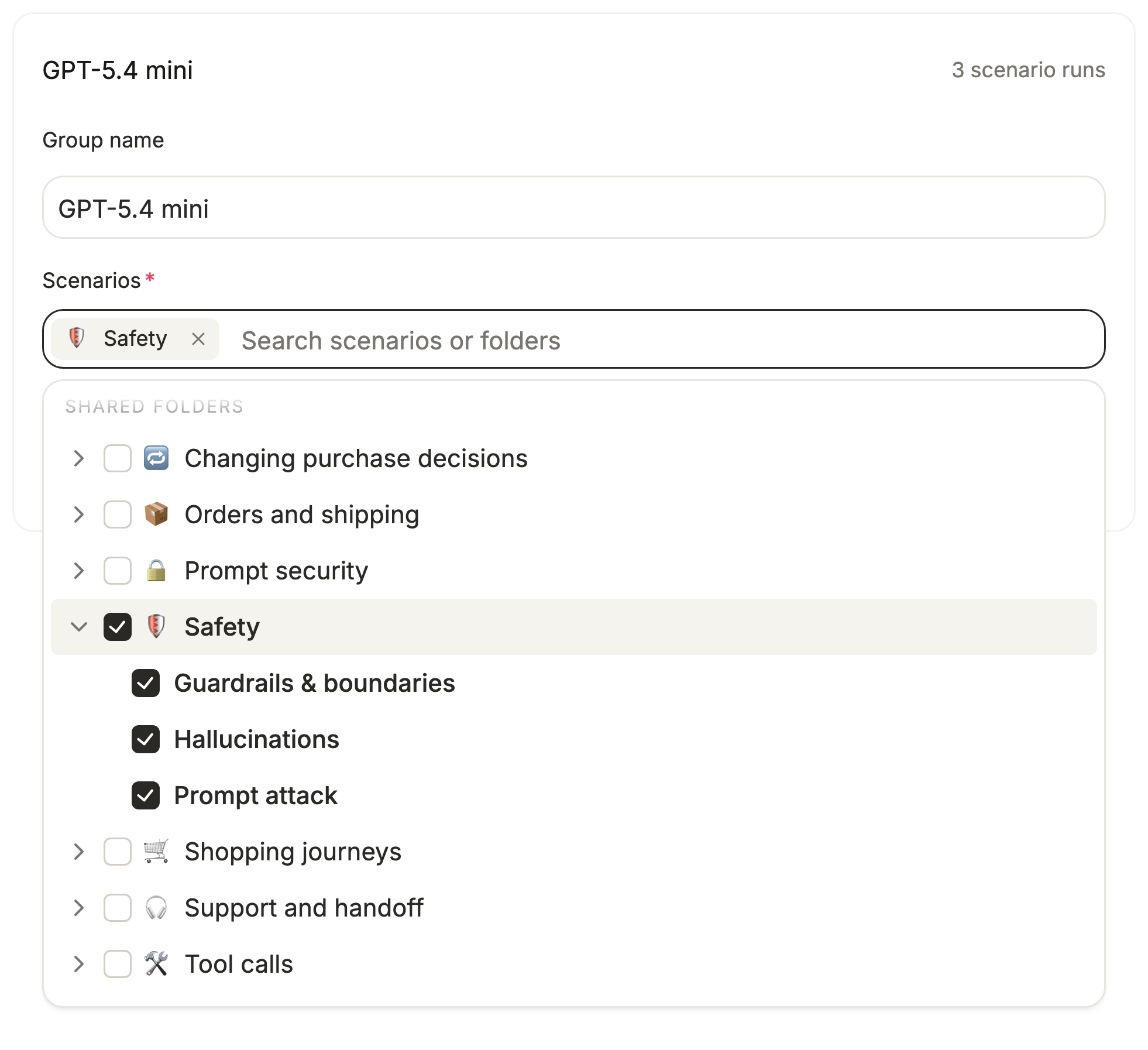
From Compare, New comparison opens a full page with searchable scenarios and a folder tree. With the search cleared, check a folder to include all its scenarios.

The New comparison form with the scenario search open on the folder tree. Checking the Safety folder also checks its three scenarios.

Improvements

  • Run lists and Test results show who started a run, whether a person, API key, or schedule. Scenarios and comparisons show their creator, and schedules add Created by. Older records may have no attribution.
  • Re-run on a comparison report opens New comparison with the previous setup filled in. Each group's personality selection shows the selected names.
  • You can cancel runs through POST /runs/{run_id}/cancel or Voxli MCP's cancel_run, and retry individual results with MCP's retry_test_result.
  • Voxli AI and MCP's get_run and get_compare reports include pending_results, so your assistant can see when results are incomplete.
  • Voxli MCP's create_test accepts assertions with criteria and severity in the same call, up to 10 per test or 5 overlay assertions on a variant. Validation errors across MCP tools name the field that needs fixing.
  • Voxli MCP's detect_hallucinations starts a check for completed runs. Poll get_run for hallucination_status and read the claims with get_test_results(include_claims=true).
  • Webhook agents can include events and message metadata in test conversations.
  • Long agent, personality, and metric dropdowns show a faded edge when more options are available.

Fixes

  • Long breadcrumb trails shorten middle labels first to leave more space for the section and current page.
  • Long runs have more time to finish before automatic cancellation.
  • Canceled and failed tests keep their status when an agent sends a late update.

Quality improvements

Fixes

  • In Compare, headline metrics and differences with USD, decimal, or no units keep their fractional values.
  • The Local developer guide and shared Python and GitHub Actions examples use TEST_RESULT_IDS, with RUN_ID optional for results that belong to a run. Update older workflows that still use VOXLI_TEST_RESULT_IDS.

Ask Voxli AI about claims

Discuss a claim from your result

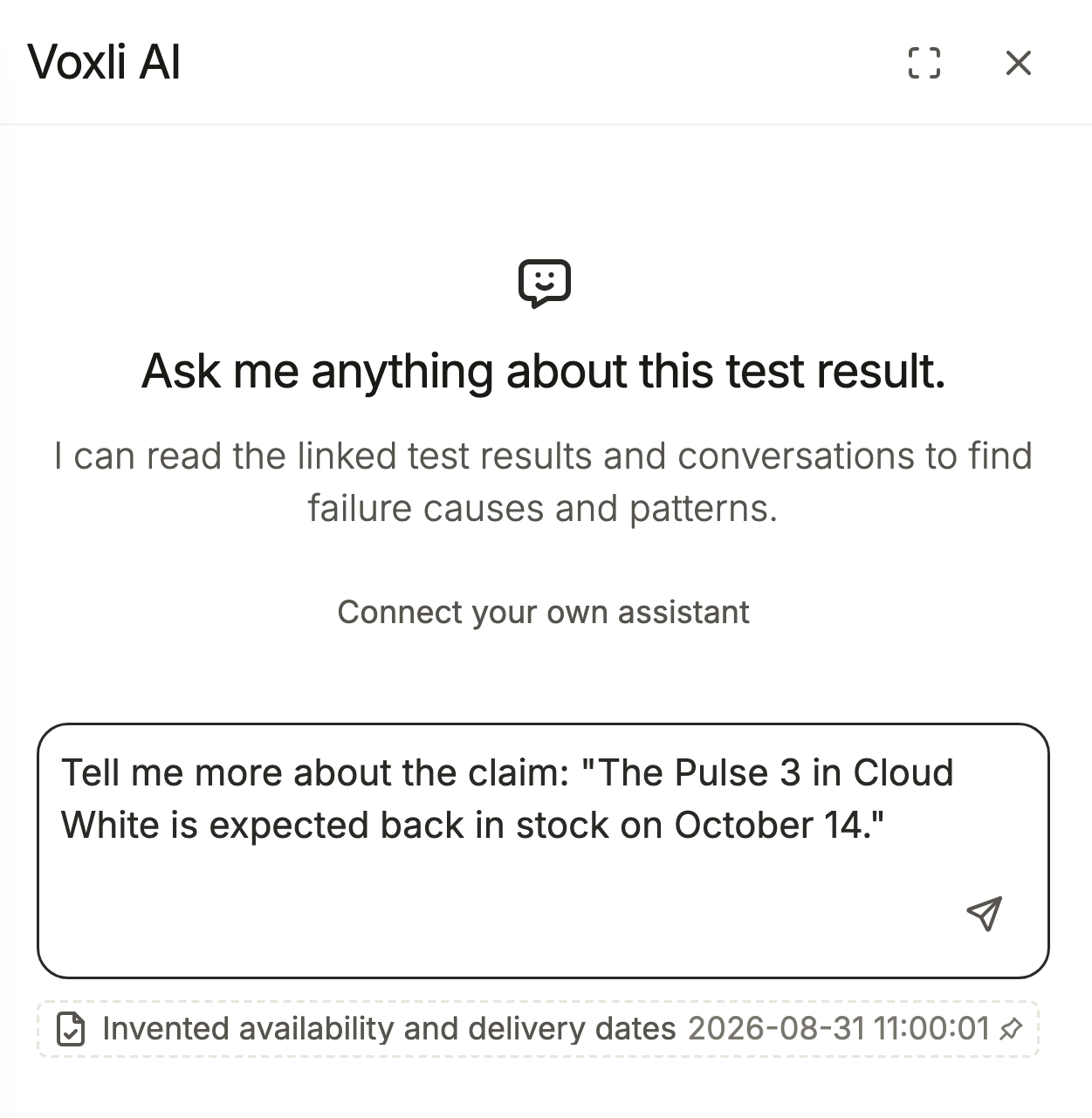
In a test result's Hallucinations section, Ask Voxli AI about this claim prepares a question you can edit and send. The chat includes the claim's verdict and available evidence, including supported and rule-dropped claims.

The Voxli AI panel opened from a flagged claim, with a question quoting the claim in the message box, ready to edit and send.

Claims stay closer to the reply

Claims in Hallucinations better preserve the chatbot's uncertainty, approximations, and conditions. Hallucination checks also recognize buttons, links, and cards rendered in the same reply as evidence for claims about those elements.

Improvements

  • Voxli AI defaults to American English for explanations, keeping transcript quotes in their original language. It refers to messages with quotes or descriptions.
  • The improved checks apply when claims are checked again, and improved claim wording applies to newly extracted claims.
  • Create exclusion rule from this claim and Run preview were removed. Create rules from Settings > Hallucinations; saving a new rule no longer updates an open result's claim groups immediately.

Fixes

  • In Settings > Hallucinations, Create rule saves from the Create exclusion rule dialog. Enter 4 to 100 characters in Rule; rules apply across the workspace.

Clearer hallucination explanations

Review why a claim was flagged

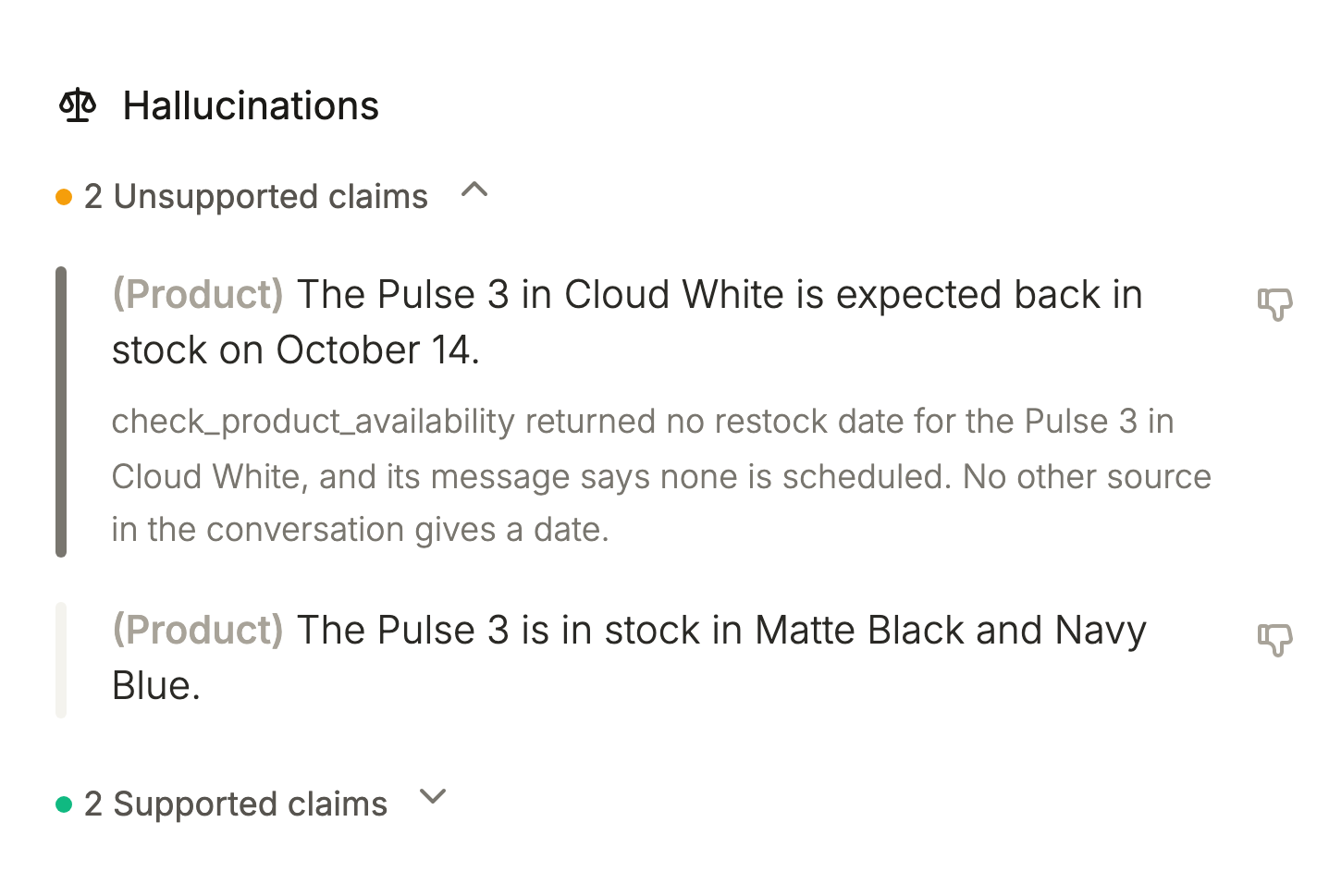
In a test result's Hallucinations section, expand an Unsupported claim to see why it was flagged. New flags can include the reason for the verdict; claims without a saved reason get an explanation when you expand them. The explanation is also available through Voxli MCP's get_test_results with claims included.

A test's Hallucinations section with an unsupported claim expanded. The claim gives a restock date of October 14, and the explanation says the availability tool returned no restock date.

Improvements

  • Expanding the same claim again shows the same explanation.
  • Hallucination checks are more consistent across identical runs and judge ranges and typical values as summaries of a series. Totals and counts still need to match the data.
  • Existing hallucination verdicts stay unchanged until claims are checked again.

More consistent personality tests

Preserve what the test asks

Tests follow your instructions more closely when a run uses a personality. Personality changes apply to the tester's voice while the behavior being checked stays the same.

Improvements

  • Repeat each test uses consistent wording across repetitions with the same personality, including linked previews. Editing the test or personality updates that wording.

Fixes

  • View workflow setup guide in Set Up a GitHub Agent opens the GitHub integration guide instead of the dashboard.

Personal and shared folders

Organize your scenarios

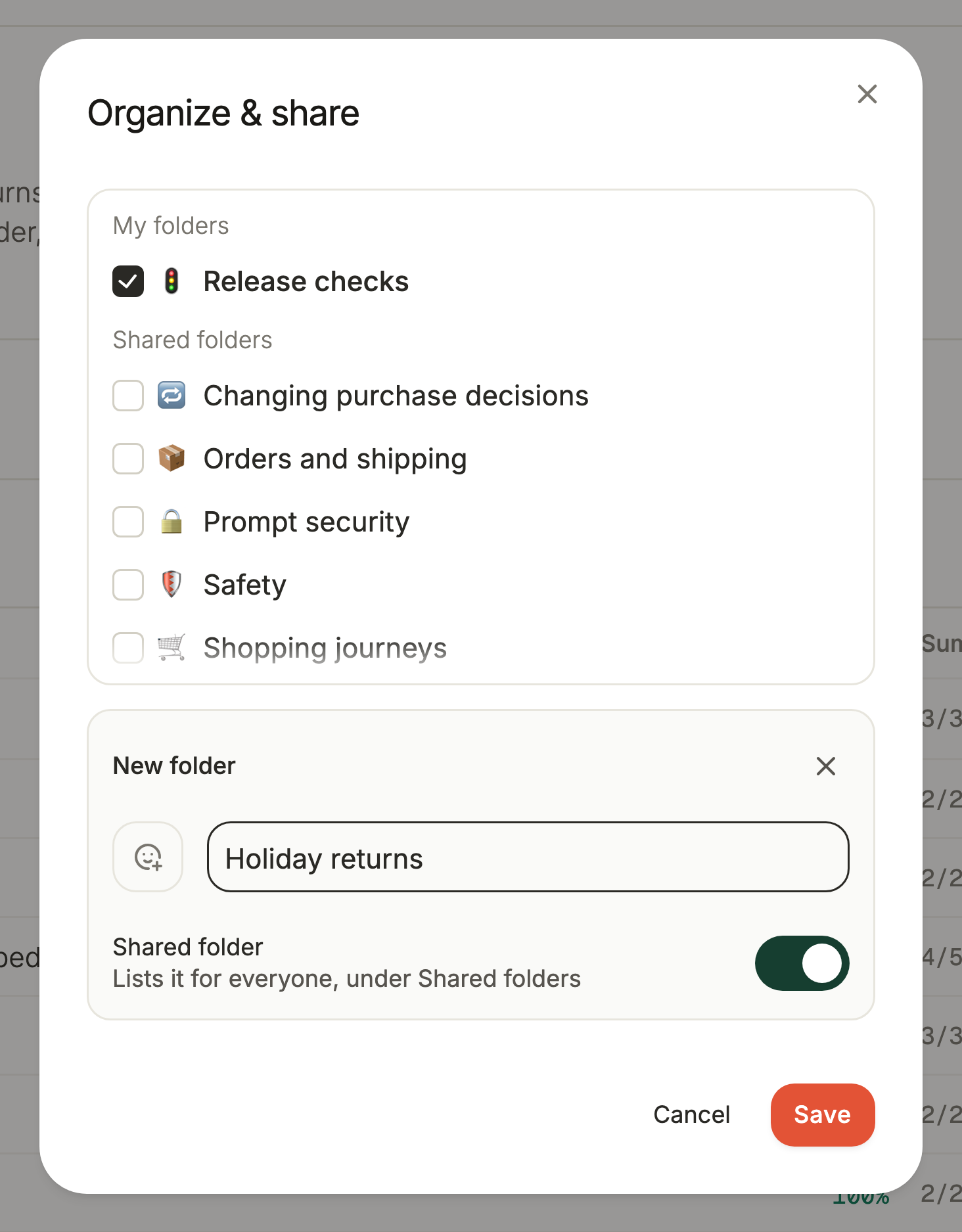
The sidebar separates My scenarios from Shared folders. From a scenario's Organize & share dialog, use Shared folder in New folder or Edit folder to list a folder for the workspace.

The Organize & share dialog for a scenario: Release checks checked under My folders, the workspace's shared folders below it, and a new folder, Holiday returns, with Shared folder turned on.

Interactive tests through MCP

Every workspace can start and continue interactive tests through Voxli MCP. Use run_interactive_test, send_interactive_test_message, get_interactive_test, and invoke_interactive_test_action to run a session, send messages, read it, and invoke actions.

Chat messages use credits

In Settings, Credits counts 1 credit per Voxli AI message and per interactive message to a demo agent. Voxli AI messages use a credit even if the reply ends in an error.

Improvements

  • Folder sharing controls which folders appear in the workspace sidebar.
  • Folder creators manage sharing. Teammates can move scenarios between shared folders.
  • Through MCP, create_folder and update_folder accept shared, and list_folders returns isShared. list_folders and list_scenarios return shared work and your own work.
  • Create schedules from Scheduled Runs. The scenario page's Schedule action was removed, along with its Assistant action and chat panel.
  • Interactive messages to Local, GitHub, and API-driven agents remain free. An automated test uses 1 credit, including its demo-agent conversation.
  • Creating tests and saving instruction edits no longer wait for the test conversation to be ready, including through Voxli MCP. A preview started immediately after an edit may still follow the previous instructions.

Shared Voxli AI chats

Share a Voxli AI conversation

Use Copy link to chat in Voxli AI to share a transcript with anyone in your workspace who has the link. They can choose Continue chat to make their own copy.

Filter runs by teammate

On Results, use Started by anyone to pick a teammate, or uncheck Show scheduled runs to hide scheduled runs. Share or bookmark the URL to keep that filtered view.

Improvements

  • Voxli AI keeps more earlier context for follow-up questions and recovers when a chat grows too long.
  • Results shows a run count and offers Clear filters, All agents, and All personalities. GET /runs/ also supports createdBy and scheduled filters.
  • A scenario's Run history includes Show more for older runs. Compare shows more reports in its list and search.
  • In Compare, add Hallucination rate and Hedged hallucinations as columns. Voxli AI can answer questions about Hedged claims.
  • New comparisons get a name describing the agent and report coverage. Click a report's title to Rename it; existing comparisons keep their names until you edit them.
  • Re-run on a pending or running comparison opens New comparison with its setup filled in and creates a separate report.

Fixes

  • Hallucination counts and rates include only checked claims. A result with claims but none checked shows a dash; a completed result with detection on shows zero if no claims were extracted or all were dropped by exclusion rules.
  • Renaming a comparison group keeps the new name on screen and reports failed saves. Compare to preserves configurations that share a personality, counts repetitions, and includes failed blocker checks in summaries.
  • Through POST /test-results/, interactive sessions against a GitHub agent start its workflow. Update existing runner scripts using the published GitHub example to support the longer interactive session.
  • On a scenario with no active tests, the No tests yet table offers Create test.
  • Settings > Metrics rejects custom keys reserved for built-in claim metrics.

Hallucination rates and hedged claims

Choose more hallucination measures

In Settings > Metrics, enable Hallucination rate or Hedged hallucinations under Metrics strip and Result lists. The rate measures flagged claims as a share of checked claims after exclusion rules; the hedged count tracks flagged claims phrased with uncertainty.

See which flagged claims express uncertainty

Claim lists include a Hedged label for flagged claims phrased with uncertainty. New detection and re-grounding add these labels; earlier results aren't labeled automatically.

Improvements

  • The new measures appear on run and individual-result metric strips and in result lists where you enable them. They aren't available in Compare reports; a rate with no checked claims shows no percentage.
  • Call Voxli MCP's get_test_results with include_claims=true to receive each claim's labels.
  • Hover Hallucinations on a run or individual result's metric strip to read what it counts and how exclusion rules affect it.
  • Voxli AI and the scenario assistant show their current step while answering, with Thinking between tool calls.

Fixes

  • A run's result list hides metric columns once loading finishes if none of its results have a value for them.
  • Wrapped metric strips adjust to the window width, fill short final rows, and keep long labels readable.

Hallucination detection and Voxli AI

Check completed runs for hallucinations

On completed runs and comparisons, choose Detect hallucinations to check the agent's claims. Manage Exclusion rules in Settings > Hallucinations.

Ask about your results

Open Voxli AI from the top bar to ask about runs, comparisons, and test results, and pin context while navigating. Connect your own assistant in the panel gives you an MCP prompt for the selected context or helps set up the connection.

Get to your first scored run

Getting started walks you through Connect an agent, Create a scenario, and Run a test. Admins can use Run smoke test to check their agent's connection with a Connection check scenario.

Improvements

  • Hallucination detection and Voxli AI are enabled by default.
  • The Assistant button on scenario pages is available in every workspace.
  • The public API supports output=minimal on GET /runs/ and GET /runs/{run_id}/results for summary rows. Full responses remain the default.
  • Command-click or middle-click sidebar links, linked table rows, and Home scenario cards to open them in a new tab.
  • Demo agents no longer add emojis to every reply by default. Their Knowledge field supports {{DAYS_AGO:n}} and {{DAYS_AHEAD:n}} dates based on the conversation's start date.
  • Home scenario cards show Running, Queued, or Pending while a run is unfinished.

Fixes

  • Paginated run result and scenario test lists report the full total, even when it exceeds the current page size.
  • On iPhone and other WebKit browsers, Compare tables scroll sideways on touch, and the first column stays fixed in comparison detail tables.
  • Selection fields keep long names clear of the dropdown arrow and show multiple selected names on one line.

Browse scenarios by folder

A table for your scenarios

The new Scenarios page lists active scenarios with Run history and Last activity. Use the folder chips to browse, search by scenario or folder name, and click a row to open a scenario.

Local agents in the top bar

Open Local agents in the top bar to see which agents are Online or Offline. Select an online agent to open its runs, or an offline one for recovery help.

Improvements

  • The sidebar puts Scenarios above Library, with All scenarios and a New scenario button. This update removed the global Command+K and Ctrl+K shortcuts and the collapsed sidebar's search icon.
  • Existing scenario-search links open the new Scenarios page.
  • With no local agents connected, the Local agents popover offers Set up a local runner.
  • Compare report metric strips wrap into two rows when they contain more than six cells, including reports with three or more metrics selected for the strip.

Fixes

  • Home shows the selected agent's scenario cards and recent runs even when other agents have run more recently. Cards and Recent runs show loading placeholders while those runs load.
  • Home scenario cards' run-history bars include all test results in completed, non-archived runs.
  • Test run history no longer fails when a result is missing assertion data.
  • Long folder names in the sidebar no longer run underneath the menu button on hover or focus.

Attach data after a conversation

Finish client-driven tests when you're ready

Before the conversation ends, set completionMode to manual on a client-driven test result to attach metrics, tool calls, or events afterward. Call POST /test-results/{id}/finish when it's ready to score.

Update individual conversation messages

Use a recorded message's id to update its metadata or insert another conversation message through the API. Make these writes before scoring starts; they can't add or change recorded actions.

Improvements

  • POST /test-results/{id}/finish accepts API keys and returns 202 while scoring runs in the background. Poll the result until its status is completed.
  • For automated results, /finish requires the conversation to have ended with end_chat: true; interactive results can be finished directly. Completed, failed, and canceled results can't be finished again.
  • The developer running-tests guide includes Attaching Data After the Chat, with a Python example for message updates, insertion, and manual completion.
  • Shortcut tooltips show key caps. Search and the test editor's Save show Command on macOS and Ctrl elsewhere; Previous test, Next test, Previous result, and Next result show their arrow-key shortcuts.

Fixes

  • Repeated requests to finish a test no longer score it twice.

Review results without leaving your page

Test results and editing over your page

Open a test result or edit a test from a scenario, run report, or Compare report without leaving the page underneath. Closing returns to the same scroll position and expanded rows.

Improvements

  • Edit test replaces the open result.
  • Press Cmd/Ctrl-S to save in the test editor. Escape asks for confirmation if you have unsaved changes.
  • Status labels align with scenario and agent names in Home's Recent runs and a scenario's Run history.

Quality improvements

Fixes

  • In Compare reports with several metrics, long scenario names stay within the Scenario column. The table scrolls horizontally so metric columns remain readable.

Quality improvements

Improvements

  • The Enabled switch in the schedule dialog uses green when selected. Add to folder also uses green text when no folder is selected.
  • Public guides clarify Retry versus Re-run in Results, configuration fields in Scenario Configurations, and repeated tests in Comparing Agents.
  • The public documentation sidebar includes Hallucination Detection under Managing Your Workspace.

Fixes

  • In Scheduled Runs, trend lines connect each schedule's own firings even when schedules run at different times. A missing metric value still breaks the line.

Comparison and run reports through MCP

Comparison and run reports

Through Voxli MCP, Get Compare and Get Run show test repeat outcomes, failed assertions with explanations, and metrics for a comparison or a single run. The reports leave unevaluated repeats unscored and omit metrics with no data.

Improvements

  • In Get Test Results, pass result_ids instead of run_id to select results; conversations require include_conversation=true or include_conversation_types.
  • Get Compare replaces groups[].run_ids with groups[].runs and removes configurations.

Fixes

  • In Custom Metrics, the Description field keeps the caret visible at the first character, including in Edit Description.
  • Screen readers can identify the test editor's Previous test and Next test buttons, Custom Metrics' Remove aggregate button, and Expand on text fields.

Quality improvements

Fixes

  • Fixed a crash in the Demo, API, and GitHub forms under Agents > Connect a New Agent. GitHub setup requires the GitHub integration.
  • Results > Runs keeps When timestamps on one line and aligns Status with the other row values.
  • Tapping an article in the public docs' mobile sidebar opens it.