Simulate real customers. Score every run. Know what to fix.
Voxli automates testing for conversational AI agents, built for teams whose agent is their product. It plays real customers against yours, scores every run against your assertions, and shows you what broke after a model swap, a prompt change, or a tool update.
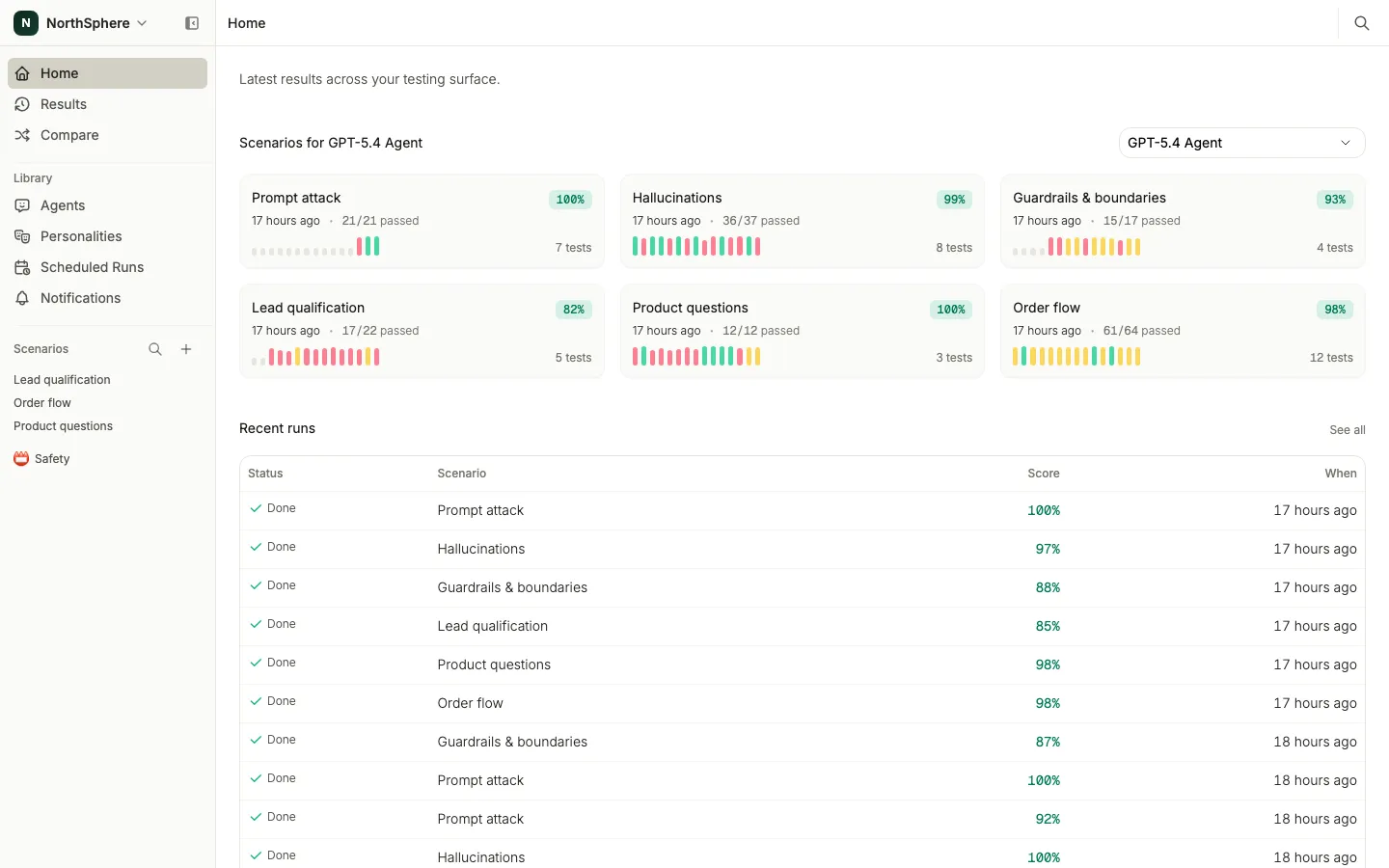
Connect, simulate, understand, fix.
This is how testing works in Voxli after every change: a model swap, a prompt update, a new tool.
- 1
Connect your agent
Voxli talks to your agent the way a customer would. Connect over the API, a webhook, or the SDK; a coding agent can write the integration in under an hour.
- 2
Simulate real customers
Write the test in plain English, with no scripts to maintain. Voxli plays the user through a full multi-turn conversation and scores every run against your assertions. Hallucination detection flags any answer the agent made up.
- 3
Understand what broke
Every failure links the assertion, the claim, and the tool call to the exact turn they came from. Then go deeper with the tool that fits.
- 4
Fix and re-run
Fix it, run the whole suite again, and watch each result land. You know right away whether the fix held.
The next change is coming. Know what it breaks before your customers do.
Write the suite once. After every model swap, prompt update, or new tool, re-run it and read exactly what moved.
Ask Voxli AI why a run failed
A run can hold hundreds of multi-turn conversations, more than anyone can read. Voxli AI reads them all and answers in plain language, with the evidence linked turn by turn.
-
Patterns across every conversation
Ask which flows fail, where the tone drifts, or how hallucinations cluster. Voxli AI reads every transcript in the run, not a sample.
-
Evidence, not guesses
Every answer links the turn, the assertion, and the tool call it is talking about, so you can open the conversation and check it yourself.
-
Drill down, then share it
Ask follow-ups until the cause is isolated: compare against the previous run, single out one personality, then have Voxli AI write the summary you send to your team.
Your coding agent fixes what Voxli finds
Connect Claude Code, Cursor, or any MCP client to your Voxli workspace. Your assistant reads the failing run, applies a fix, and runs the tests again.
- Browse your scenarios and agents
- Trigger test runs from your editor
- Read detailed results, turn by turn
# Connect your workspace
$ claude mcp add voxli --transport http https://api.voxli.io/mcp
# Then ask your assistant
> Look up the latest run in Voxli and analyze why it failed.
“We had our development team spend three months building internal tools to handle what Voxli does out-of-the-box.”
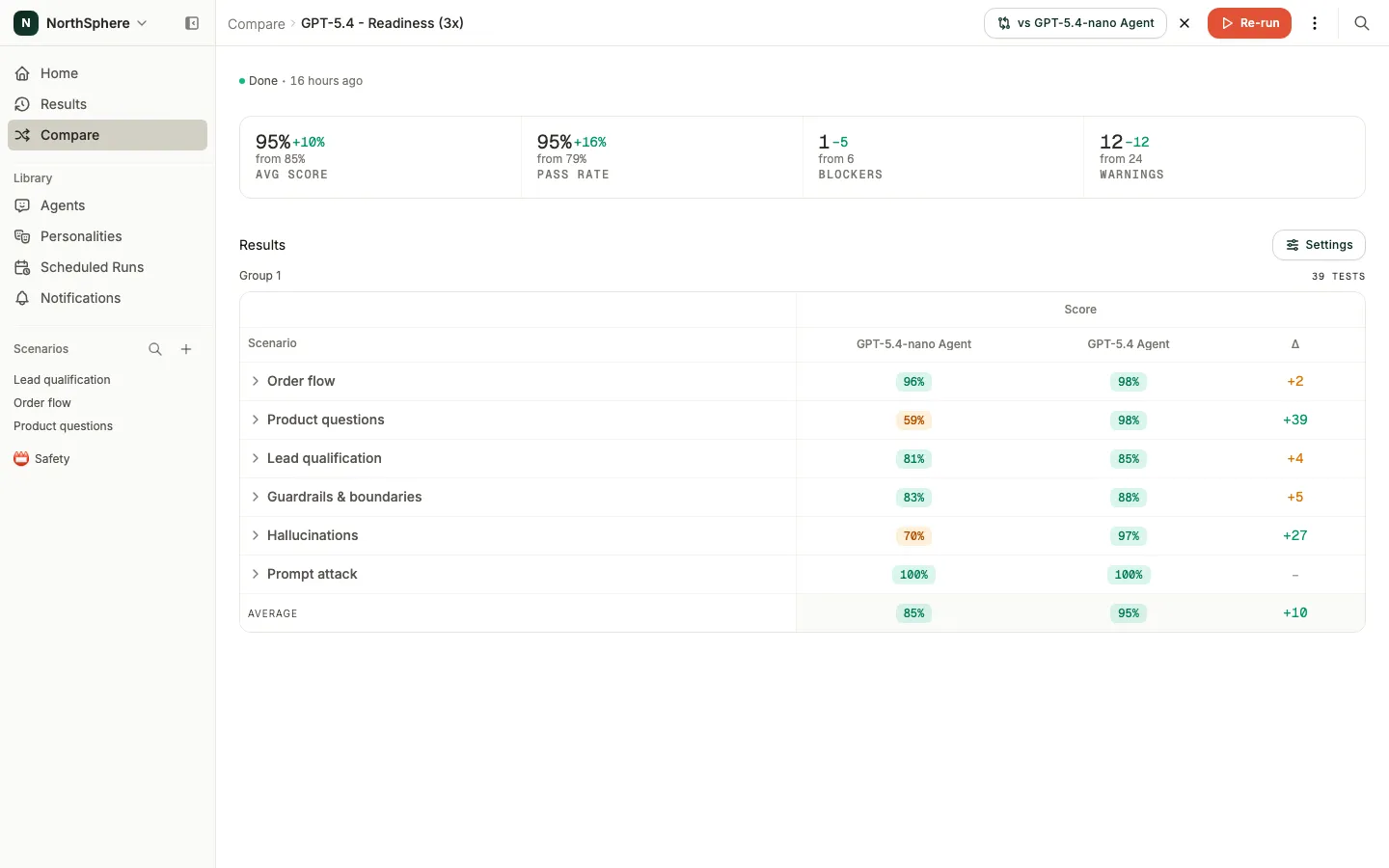
Compare your agents
After a model swap, a stack change, or a prompt update, run the new version against the one in production on the same tests. Compare has cleared upgrades to ship, and it has held them back.
-
Every way an upgrade can regress
Read the delta per scenario for score, hallucination count, response time, and cost. A new model that answers well but promises more than it should shows up here.
-
Repetitions beat non-determinism
The same test can pass once and fail twice. Run each test several times and compare aggregated scores, so a lucky pass never decides the upgrade.
-
Ask Voxli AI what changed
Point Voxli AI at the comparison and it names the patterns: a language where hallucinations climbed, a flow that stopped calling its tools.

Automate your testing
Put the suite on a schedule and let it run while you build, so a regression reaches you before it reaches your customers.
Scheduled runs, charted over time
Describe a schedule in plain language and Voxli runs the suite on it. Every run lands on a trend chart, and every point on it opens into the full run behind it. Your agent drifts even when you ship nothing; the chart is where you catch it.
Alerts on every regression
A failed scheduled run reaches you in Slack or email, with a severity threshold: blocker-only, medium and up, or any failure.
Runs in your CI
Trigger the suite yourself on a pull request or a draft release, or let Voxli trigger it in GitHub Actions. Your agent runs on your own infrastructure, and Voxli never needs access to your code.
Replay production logs into regression tests
Bring real conversations in through the API and re-run them against your agent. Teams have reproduced live bugs this way, tracked down the cause, and kept the failing conversation as a test so the same bug cannot come back.
Connect anything
Voxli talks to your agent the way a customer would: it sends a message and records the reply. Most teams build that over the API, and a coding agent can write and verify the integration in under an hour. For voice agents, a text to speech and speech to text bridge carries the same conversation over whatever protocol your agent speaks.
- API
- Local runner via the SDK
- GitHub Actions
Ready to see it on your agent?
We are early stage and founder led. Book a call and talk directly with the people building Voxli.